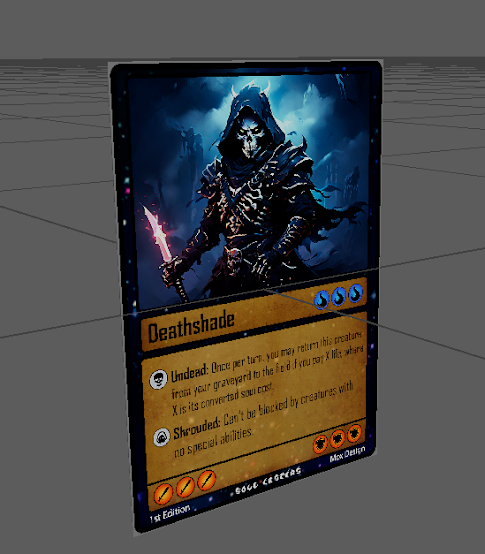
I imported a card in Maya and i'm trying to make it as a 3D card, My goal is to make the Card 3D, with an interactable functionality so that i can Switch Card during the gameplay in Unreal Engine. The card is readable, this shows that my photoshop format is good, now i'm trying to make sure that i can create a simple effective way of maintaining the card and making it playable, then I need to make different cards. This is the base 3D mesh for the cards once i completed the border i tested it on the card art Front Back The UV map This is how it would look in game I imported the model in Unreal Engine 5, and the model is actually small just like a real trading card. I then imported a table model from Sketchfab in unreal engine I then imported the other cards, to test the quality of the artwork, and I applied some textures on the table model. I made a quick Video showcasing this These are the Cards faced upside down on the Table I'm not very fluent with Blueprints, so I hav...
The Creation of the Pokeball Machine Recently i finished playing Pokeemon Violet and during my playthrough I was intrigued by the the idea of creating an asset for the game. I started doing some reaserces and I stumbled across the Pokemon Lab , in particular the machine that stored the pokeballs. The original Pokeball machine was just placed as decoration, the 3 starters were placed in the desk and ready to be chosen by the player. The Remake Machine from the first game has 5 Pokeball inside a glass container, protected by a password system. I want to create a simple model to represent the feeling of choosing your first started from the Pokemon franchise. First I need to work on the base model. My workflow will start with Maya. The first thing to create is a 3D Pokeball, I previously worked on this particular model, so I will recreate something similar. Once our main focused point is created, we need to make the base of the Machine. thankfully they are simple geometry, cylin...
Description The Whispering Zephyr is a sleek and elegant wind-themed staff, designed to channel the power of the skies. Its shaft is crafted from lightweight, silvery wood that seems to shimmer faintly, as though it were infused with the essence of a storm. Spiraling up the length of the staff are intricate engravings of swirling winds, clouds, and soaring birds, glowing softly with a pale blue light. At the top of the staff sits a crystalline orb, suspended in midair by a delicate framework of golden filigree. The orb appears alive, constantly swirling with miniature cyclones, crackling lightning, and a faint mist. Feather-like decorations dangle from the sides of the staff, shifting and rustling as if caught in a perpetual breeze. When held, the staff emits a faint hum, as though whispering secrets of the wind to its wielder. It’s a weapon as much as it is a connection to the natural forces of the air. Functionality The Whispering Zephyr is more than a weapon—it’s a tool of imme...




Comments
Post a Comment